Repeat table headers across PDF pages
Use semantic headers, understand the engine limits, and test per-page repetition.
Read as Markdown · Open in the interactive guide
Keep the column labels close to the rows they describe. There are two levels to this: mark the header correctly, then decide whether your HTML layout needs the PDF engine's optional pagination rule.
Before you start: You have a working repeated table. Make a copy of the template and prepare enough rows to fill at least three pages.
For Word templates
Put {RepeatHeader} once in the row containing the column labels. Keep the data-loop tags in the data row. Portwood removes the marker and turns the marked row into a table header during conversion.
| {RepeatHeader}Name | Email |
| {#Contacts}{Name}  | {Email}{/Contacts} |
For giant-query documents, save the template again after adding the marker so the prepared sections capture it. This marker identifies the header; it does not guarantee perfect per-page pagination in every PDF layout.
For HTML templates
Use a real <thead> for labels and <tbody> for the repeated row. Keep both loop markers inside cells; text placed directly between table rows can be moved by an HTML editor or parser.
<table class="directory">
    <thead>
        <tr>
            <th>No.</th>
            <th>Name</th>
            <th>Email</th>
        </tr>
    </thead>
    <tbody>
        <tr>
            <td>{#Contacts}{RowNumber}</td>
            <td>{Name}</td>
            <td>{Email}{/Contacts}</td>
        </tr>
    </tbody>
</table>
.directory {
    width: 100%;
    border-collapse: collapse;
    table-layout: fixed;
    page-break-inside: auto;
}
.directory thead {
    display: table-header-group;
}
.directory tr {
    page-break-inside: avoid;
}
.directory th,
.directory td {
    border: 0.5px solid #808080;
    padding: 5px 6px;
}
Start with the header shown above. If the labels appear on the first page only, add the pagination rule below and generate the same document again.
Opt in to per-page table pagination
For a controlled HTML template, add this engine-specific rule:
.directory {
    -fs-table-paginate: paginate;
}
With that rule, the downloadable lab printed all 90 rows across four pages, repeated the column header on every page, and retained the two-line page-count footer. Inspect the second page below.
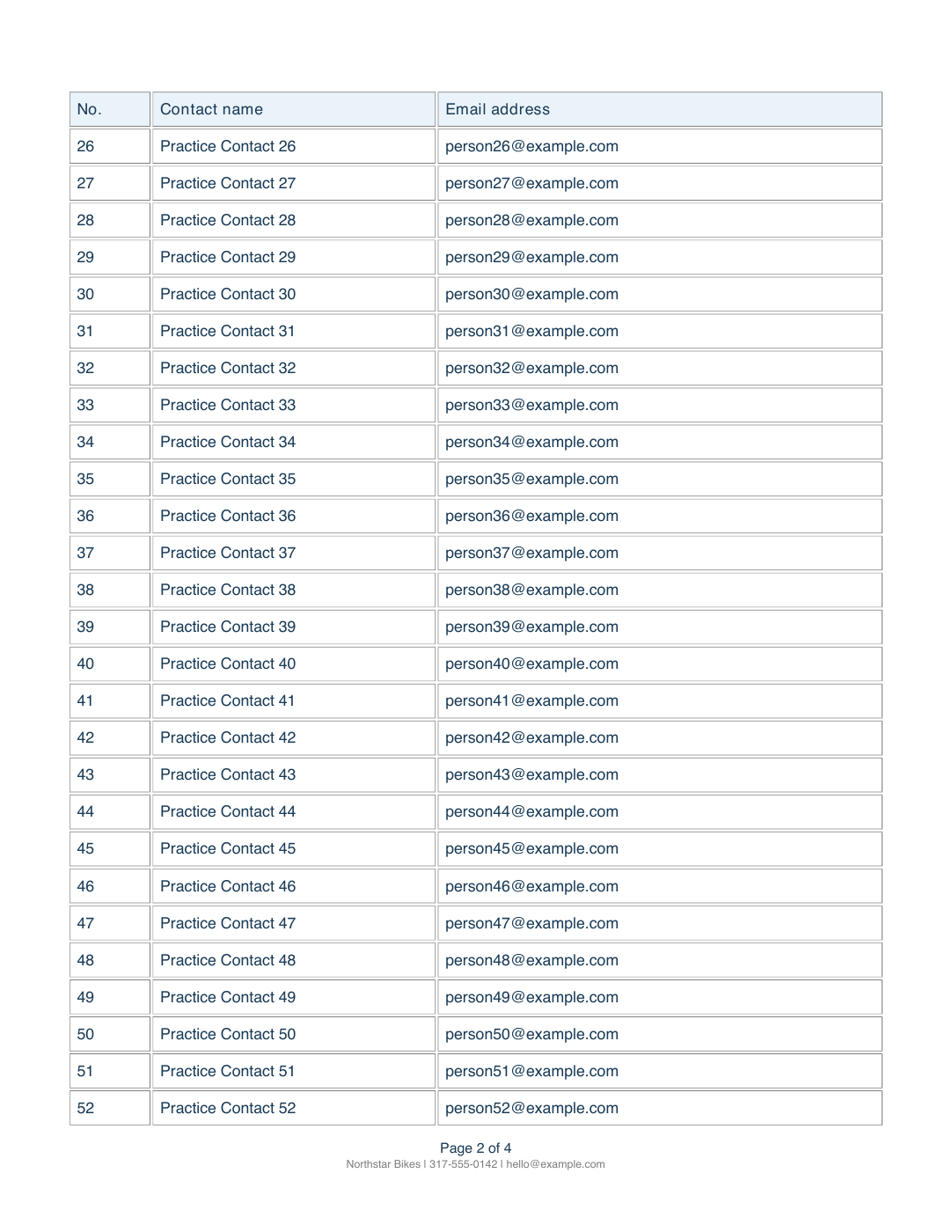
Portwood does not apply this rule to every template. Earlier layouts suffered mis-pagination with running page headers/footers and large bordered tables. Treat it as a template-specific choice: test long cells, wrapping rows, running headers, different page sizes, and the actual single, bulk, or giant-query entry point. A row taller than a page cannot be kept together simply by asking CSS to avoid a break.
Try the exact lab
Use the HTML body and Footer HTML. The lab uses prepared Name and Contacts.records data; it does not require 90 real Contacts in your org. For normal Account queries, select the Contact fields and use the matching relationship alias.
You are done when: Every row appears once, labels repeat where needed, and no row or footer overlaps on any page.
The semantic-table approach was adapted from a Portwood Community example. Try the rule with your own longest table and compare it with the multi-page service schedule.