Build a linked contents page and a draft watermark
Give readers clickable destinations, live page numbers and a draft mark that follows the quote.
Read as Markdown · Open in the interactive guide
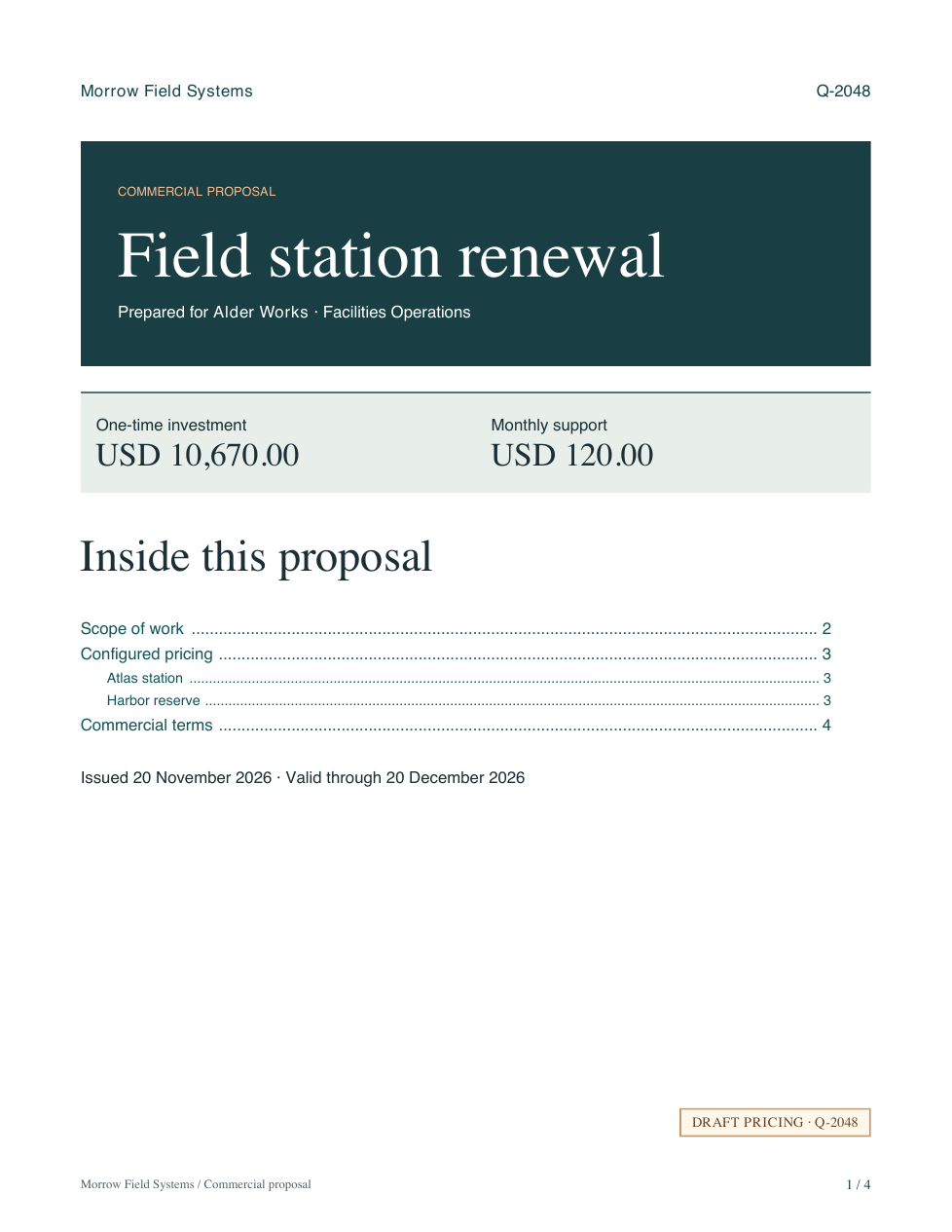
Give the reader shortcuts through a long PDF. In the finished proposal, every entry on the cover links to the named section. The dotted leaders end in the current page number. The draft copy also carries its quote number on every page.
Open the finished proposal · Read the text edition · Download the design files
Create an entry and its destination
Put this link on the contents page. Give the section heading the matching ID. Keep the ID unique across the document.
<div class="contents"><a href="#pricing">Configured pricing</a></div>
<h2 id="pricing">Configured pricing</h2>
<a href="#contents">Return to contents</a>
Give your contents heading id="contents" for the return trip. For repeated sections, use a short permanent key for each item. The sample uses href="#bundle-{Key}" in the contents and id="bundle-{Key}" on the matching bundle. Two products can have the same display name and still need different keys. Gate an optional entry and its destination with the same condition.
Let the renderer calculate the page
.contents a { display: block; text-decoration: none; }
.contents a:after { content: leader('.') target-counter(attr(href), page); }
.section { page-break-before: always; }
The link supplies the destination. The CSS adds the dotted line and the page where that destination actually landed. In the supplied PDF, Commercial terms is on page 4. We added 42 component lines and generated again. The terms moved to page 7 and the contents entry and link moved with them. This is a contents page inside the PDF. Open the downloaded file in a PDF reader to test a jump in each direction.
Print a watermark from HTML
For review copies, put a fixed element near the start of the body. Bind the optional block to a Boolean and print a record-specific value in the mark.
{#IsDraft}<div class="stamp">DRAFT PRICING · {QuoteNumber}</div>{/IsDraft}
.stamp {
    position: fixed; bottom: 0; right: 0;
    font: bold 9pt Helvetica; letter-spacing: 1pt; color: #674329;
    border: 1pt solid #c19a72; padding: 3pt 7pt; background: #fff8ea;
}
The proposal puts the stamp at the bottom of the printable area and its folio in the bottom page margin. IsDraft: true printed the stamp on all four pages. With false, the longer release copy had no draft stamp. Reserve that corner so the mark has room when a table grows. For diagonal artwork or a full-bleed letterhead, upload a pre-sized image under Watermark / Background. Use page artwork
Add running folios
@page {
    size: Letter; margin: 0.65in 0.72in 0.85in;
    @bottom-right { content: counter(page) " / " counter(pages); }
}
The sample supplies its own page CSS and leaves Portwood’s separate Header HTML and Footer HTML empty. If your existing template already has a branded footer, use its running footer recipe and choose one place to draw the page number.
To try this with your own data, start with Generate a studio sample.